100% Client-Side · Zero Servers · Open Source

Your next meeting has a
secret weapon.

See exactly what to say, when to say it, and how the room is really feeling — live, inside Google Meet. No subscription. No server touching your data.

Built for professionals who refuse to wing their most important conversations.
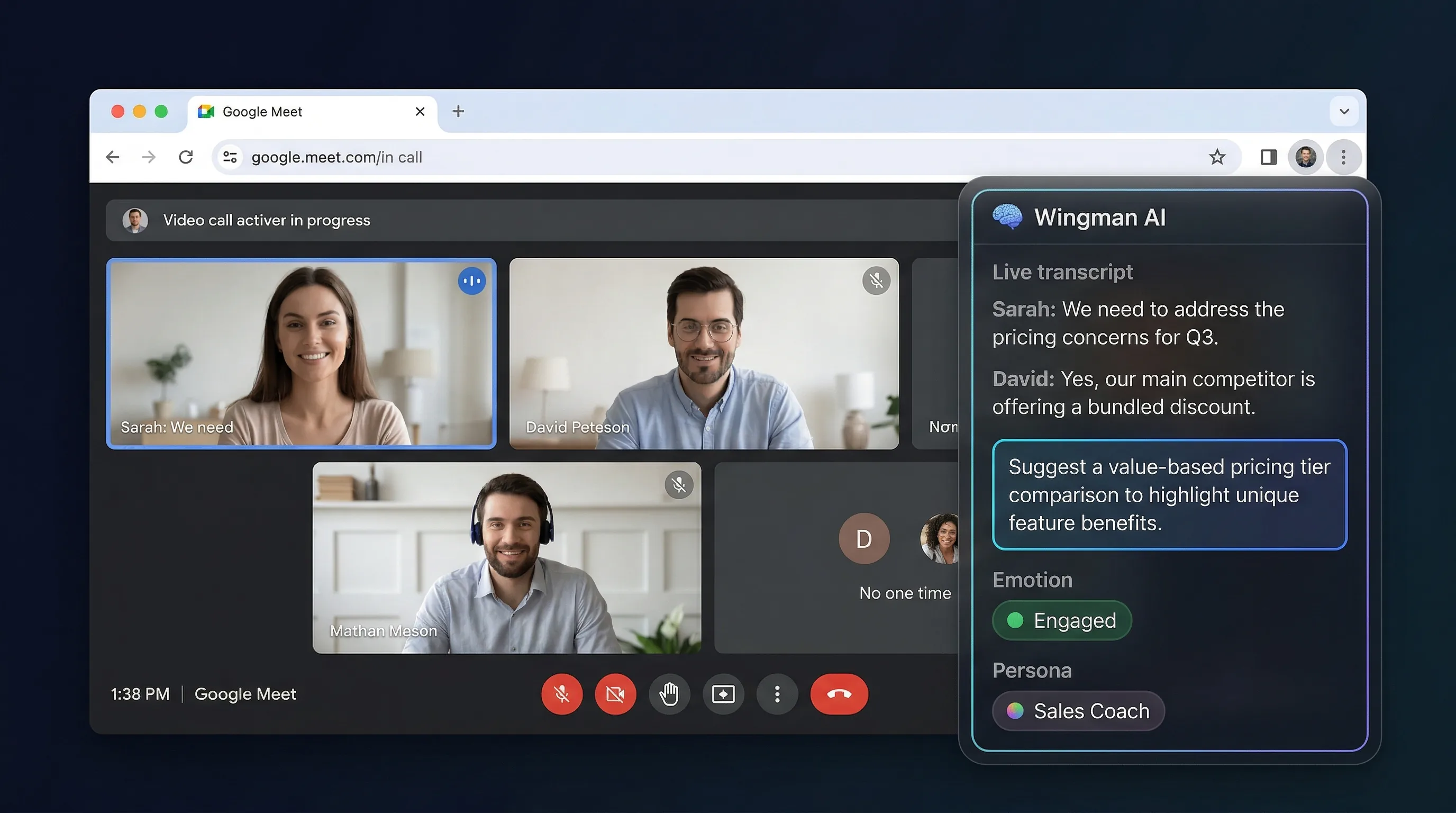
Wingman AI overlay inside a Google Meet call showing live transcription, AI suggestions, and emotion detection
Real overlay UI showing emotion detection — frustrated and engaged states
Emotion-Aware Overlay
A live read on the room. See the exact moment someone disengages.
Post-call summary with action items and key moments
Post-Call Summary
Action items, key moments, and decisions — before you close the tab.

You forget 70% of new information within 24 hours. Your last important call is already fading. Every detail you missed is a follow-up that won't happen and a deal that slips.

— Ebbinghaus forgetting curve (1885), replicated in modern cognitive science
Everything you're missing
in your meetings

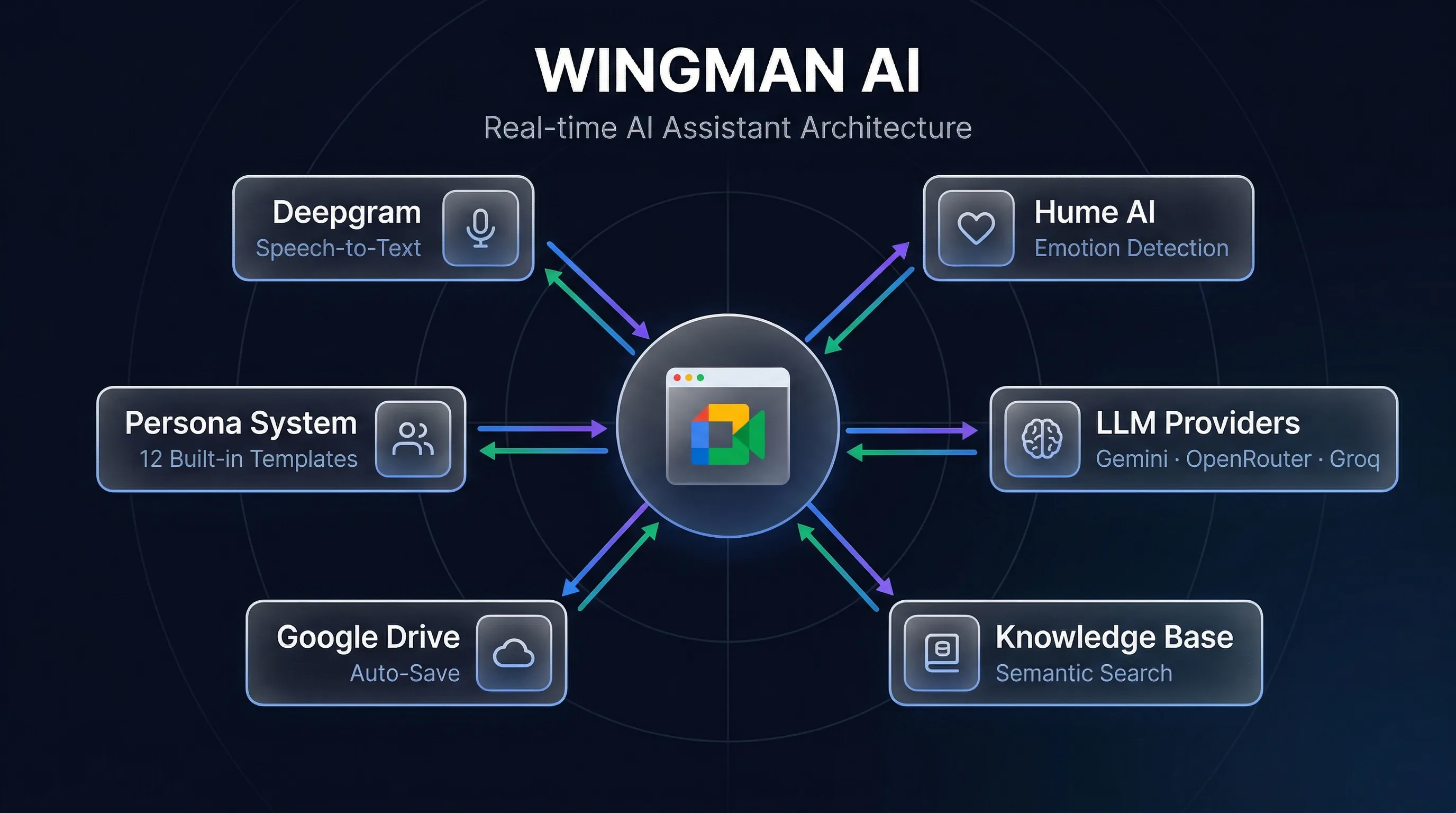
Powered by Deepgram, Hume AI, and your choice of Gemini, OpenRouter, or Groq. Enterprise-grade AI. Zero enterprise pricing.

Stop scrambling for notes

Real-Time Transcription

Every word, every speaker, captured while you stay focused on the conversation. Search it later. Never say "can you repeat that?" again.

Stop guessing what to say next

AI-Powered Suggestions

Context-aware responses that understand the full conversation. The right words surface exactly when you need them — not five minutes too late.

Stop alt-tabbing during the call

In-Meeting AI Assistant NEW

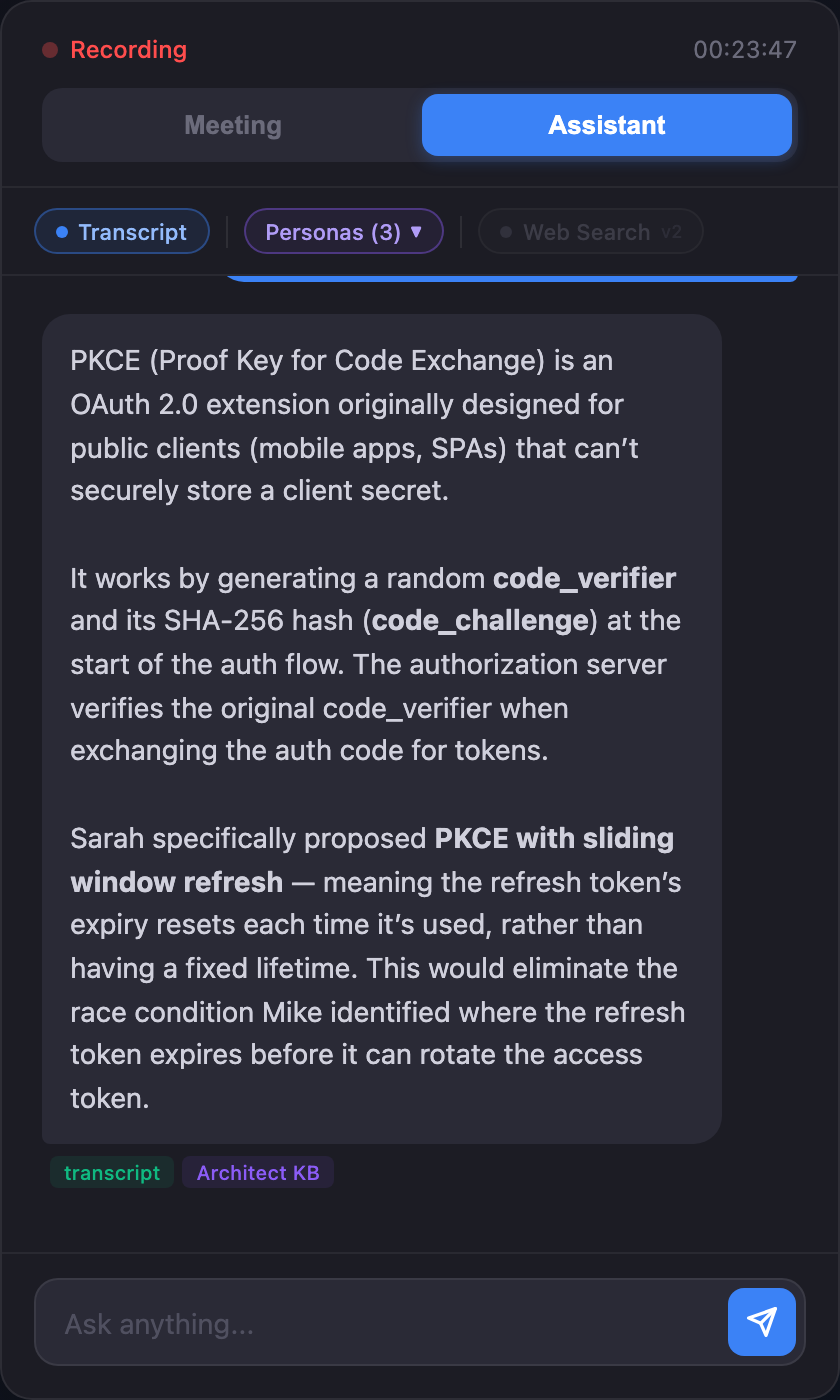
Switch the overlay to Assistant mode mid-call to ask the AI a question. Answers stream back grounded in the live transcript, your persona Knowledge Bases, and (optionally) live web search. Each reply tags which sources it used.

Stop missing the room

Emotion Detection

A live read on the room. See the exact moment someone disengages — and pivot before you lose them. Powered by voice prosody analysis, not video.

Meetings end, context disappears

Post-Call Summaries

Action items, key decisions, and follow-ups — generated and saved to Google Drive as a native Doc before you close the tab. Your future self will thank you.

One prompt can't fit every call

Multi-Persona System

11 built-in personas — Sales Coach, Interviewer, Fundraiser, and more. Each with its own system prompt and knowledge base. Switch your AI's expertise in one click.

Generic AI doesn't know your domain

Knowledge Base

Upload your PDFs, docs, and notes. Wingman searches them semantically and injects the right context into every suggestion. Your AI, trained on your world.

Clone the Repo

4 commands. 3 minutes. Try it on your next call.

Stop alt-tabbing.
Just ask the AI mid-call.

Switch the overlay to Assistant mode and type a question. Answers stream back grounded in the live transcript, your persona Knowledge Bases, and (optionally) live web search. Each reply tags which sources contributed. The chat history persists across pill toggles.

In-meeting AI Assistant answering a question grounded in the live transcript and a persona Knowledge Base — source tags "transcript" and "Architect KB" visible at the bottom of the answer
Transcript-grounded Persona KB-grounded Live web search General knowledge

One AI assistant is nice.
Four is unfair.

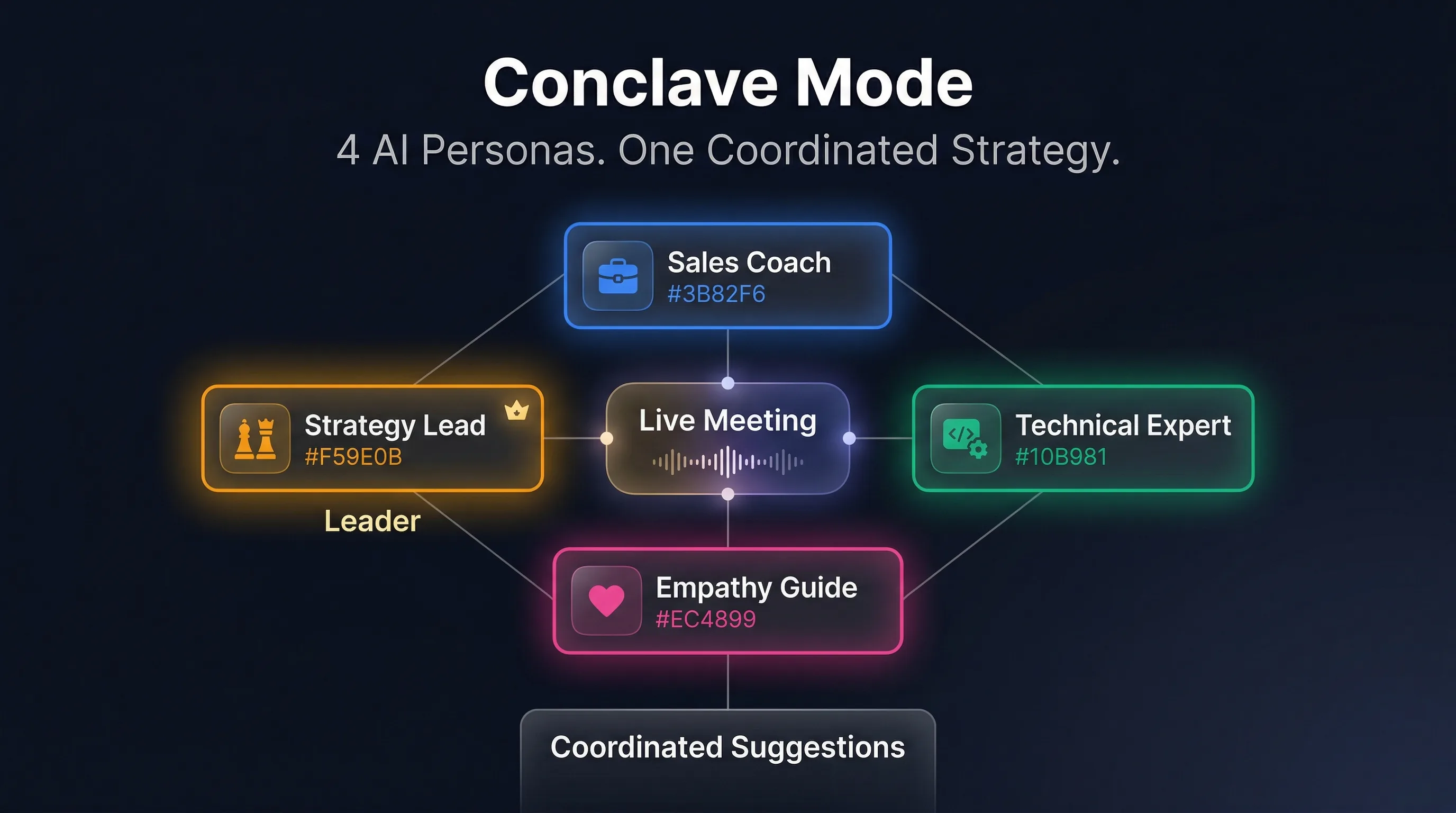
Conclave Mode activates up to 4 AI personas simultaneously. A designated leader coordinates their insights into one cohesive strategy — live, during your call. No other tool does this.

Conclave Mode — 4 AI personas collaborating in real-time during a live meeting
Sales Coach Negotiator Technical Expert Empathy Guide Strategy Lead Interview Coach Fundraising Customer Success

Your keys. Your data.
No middleman.

100% client-side. No backend server. No data collection. No accounts. Don't take our word for it — read the code yourself.

🔐

Bring Your Own Keys

You provide your own API keys for Deepgram, Gemini, OpenRouter, Groq, and Hume. We never see them. They stay in your browser, always.

🖥

Zero Servers

No backend. No database. No user accounts. No analytics. The extension runs entirely in your browser. There is nothing to phone home to.

👀

Fully Open Source

Every line of code is public. TypeScript strict mode. Vitest coverage. No obfuscation. Audit it, fork it, or contribute — it's yours.

Free to start. Pennies to run.

No subscription. No markup. You pay the API providers directly at their published rates. We take nothing.

~$0.50
per hour of meeting
With generous free tiers, your first 100+ hours cost nothing.
Deepgram (transcription) $0.0077/min
Deepgram free tier $200 credit (~430 hrs)
Gemini Flash (suggestions) ~$0.02/hr
Gemini free tier 1,500 req/day
Hume AI (emotion) Optional

Built for speed and privacy

Audio flows directly from your browser to the APIs you choose. Insights flow back in real time. No intermediaries. No black boxes.

Wingman AI radial architecture diagram

Questions? Answers.

No. Audio is streamed directly from your browser to Deepgram and Hume AI for processing. Nothing is saved, recorded, or sent to our servers — because we don't have servers. Transcripts are only stored locally in your browser session unless you explicitly save them to Google Drive.
Right now, setup requires a few terminal commands: git clone, cd extension, npm install, npm run build. If you're comfortable with that, you're good. A Chrome Web Store listing is planned — star the repo to get notified when it ships.
Yes — any Chromium-based browser works: Chrome, Edge, Vivaldi, and others. The extension uses Chrome's TabCapture API and falls back to web-based OAuth for non-Chrome browsers.
Emotion detection uses Hume AI's research-grade expression measurement API, which analyzes voice prosody (tone, pace, pitch) — not facial expressions. From 48 emotion signals, it distills 4 actionable states: Engaged, Frustrated, Thinking, and Neutral. It's a directional signal, not a lie detector. Think of it as a pulse check on how the conversation is landing.
Fully. Each persona has a customizable system prompt. Upload domain-specific documents to the Knowledge Base. Run up to 4 personas simultaneously in Conclave Mode. Import and export persona configs. Built-in tutorials walk you through everything after install.
Costs are capped by your API key limits — you set those directly with Deepgram and Gemini. Wingman shows real-time cost tracking during every session so you always know what you're spending. A typical 1-hour call costs about $0.50 after free tiers expire. There are no hidden fees because there's no middleman.
AD
Antoine Dubuc
Founder · AI Entourage, Inc.

I built Wingman AI because every meeting tool I tried wanted my data on their servers. I don't think your conversations should live on someone else's infrastructure. This is early, it's open source, and it's built by one person who cares more about getting the architecture right than hitting a launch date. If that resonates, clone it, try it, and tell me what's broken. The code is the proof.

Your next meeting could have
a Wingman.

Open source. Free APIs. Four terminal commands.

Your competitors are still winging it.

Clone & Build — It's Free